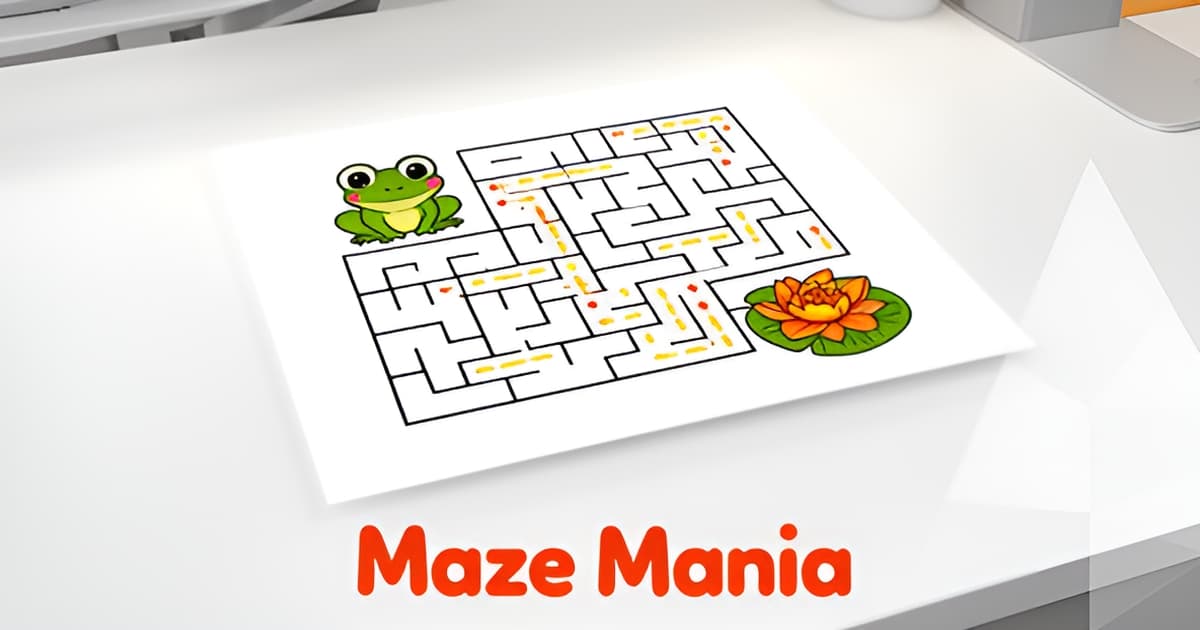
Can you give me some examples of maze games?
Key Facts
- The best printable maze games follow a 'help the character' pattern, Edublox catalogs eight themed examples from frog to spaceship.
- A 10x10 maze typically takes its target age group 3–7 minutes to solve, per a maze worksheet guide.
- One maze design can become three difficulty levels sharing the same solution: DoYouMaze's easy version had 85 choices, the hard version 200.
- Maze grids scale by age: Pre-K kids solve 4x4–5x5 grids while grades 7–12 tackle 25x25 and beyond.
- Content-inside-the-maze worksheets place vocabulary along the path so students reveal it in order, Tools for Educators offers 2,000+ vocabulary images.
- Occupational therapists commonly use maze and path-tracing activities for fine motor and visual tracking practice.
- The mobile game Maze+ was part of a catalog crossing 55 million downloads, proving the maze format's popularity.
Why Maze Games Work (and Why You Keep Looking for New Ones)
If you've ever typed "can you give me some examples of maze games" into a search bar at 4 p.m. with a restless kid at the kitchen table, you already know the real question: you need something fresh for a rainy day, a restaurant wait, a classroom, or a birthday party. Maze games answer that need better than almost any other printable, and there's a reason you keep coming back for new ones.
The classic examples follow a "help the character" pattern. An educational publisher catalogs eight popular formats: a frog maze where kids help the frog reach his friends, a spaceship maze with a dual objective (fly to the moon, then return to Earth), a Santa maze to find the sack of gifts, a ghost maze, a penguin maze, a fish escaping a labyrinth, a spider web maze where raindrops act as obstacles, and a pencil-and-eggs maze that doubles as a coloring page.
So why do these hold attention so well? According to a worksheet design guide, mazes keep students "actively making decisions rather than passively receiving content," and wrong turns provide "immediate feedback without judgment." Kids lean in, plan ahead, backtrack, and try again without realizing they're building critical thinking skills. Practitioners also cite the physical benefits: occupational therapists commonly use maze and path-tracing activities for fine motor and visual tracking practice, and mazes help children practice penmanship by encouraging careful control and staying within the lines.
The format scales across ages, which is why it works for mixed groups:
- Pre-K and kindergarten: small 4x4 to 5x5 grids, solved in a couple of minutes
- Grades 1–3: 8x8 to 12x12 grids at easy or medium difficulty
- Grades 4–6: 15x15 to 20x20 grids, medium to hard
- Grades 7–12: 25x25 and up for a genuine challenge
Difficulty is a designable lever, too. One maze designer's case study identifies five levers, including the length of dead ends and the number of decisions required; an "easy" version still contained 85 total choices, while the hard version of the same maze hit 200. That means you can print Easy, Medium, and Hard versions of the same maze with identical solutions, perfect for siblings or a classroom.
It's also why families and teachers keep generating new ones. A single maze gets solved once, so you need variety: seasonal themes, animal characters, obstacle mazes, even content-inside-the-maze worksheets where solving the path reveals vocabulary or quiz answers in order. When you generate your own with Printoodle, you can match the maze to the moment: a ghost maze beside a round of halloween trivia in October, or a stack of mazes and a family trivia game for game night. Print it. Doodle it. Done.
8 Examples of Maze Games You Can Print Today
So, can you give me some examples of maze games? Yes, and the best ones share a simple trick: they give the solver a character to rescue. That framing turns a puzzle into a story, and it's why the most-loved printable mazes for kids follow a handful of repeatable design patterns.
A popular catalog of printable maze games from Edublox shows exactly how this works. Each of its eight examples builds the puzzle around a "help the character" objective. Here they are, with the design pattern behind each:
- The frog maze, help the frog join his friends. Classic animal-rescue framing, the easiest pattern to replicate for any creature.
- The spaceship maze, fly to the moon and back to Earth. A dual-objective maze, so the path has two goals instead of one.
- The Santa maze, find the sack of gifts. Seasonal theme, perfect for December activity packs.
- The ghost maze, help the ghost find the exit. A Halloween staple that pairs nicely with a round of halloween trivia at a classroom party.
- The spider web maze, reach the middle while dodging raindrops. Obstacle avoidance layered on top of pathfinding.
- The penguin and fish mazes, waddle home, or escape the labyrinth. Two takes on the same animal-escape pattern.
- The pencil-and-eggs maze, solve the maze, then color the eggs. A hybrid activity that doubles the time one printed page keeps a kid busy.
Notice the patterns, because they're your design toolkit: help-the-character objectives, seasonal themes, dual objectives, obstacle avoidance, and maze-plus-coloring hybrids. Pick a character, pick a pattern, and you have a maze worth printing.
These fit real life, too. The Edublox examples are pitched for rainy afternoons, quiet restaurant waits, and low-tech classroom moments, while other maze libraries cite birthday parties and family game nights. A stack of printed mazes plus a family trivia game covers an entire evening without a screen in sight.
The educational angle is real, not just marketing. Edublox notes mazes encourage careful pen control and staying within the lines, and a worksheet generator guide points out that occupational therapists use path-tracing for fine motor practice. A typical 10x10 maze keeps a child engaged for 3–7 minutes, and a themed version of any of these eight takes under two minutes to create with a tool like Printoodle. Print it, doodle it, done.
Mazes That Teach: Content-Inside-the-Maze and Subject Ideas
If you're asking "can you give me some examples of maze games" with a classroom in mind, the answer goes beyond cute characters. One of the most useful formats for teachers is the content-inside-the-maze worksheet, where vocabulary words, equations, or quiz questions sit directly on the path, and students solve the maze to reveal the content in order.
The format works because the maze itself enforces sequence. Tools for Educators, which offers a library of over 2,000 vocabulary images, places content in numbered squares inside the maze path in three formats (6, 9, or 12 squares), so students encounter each item in the order the teacher intended. As one maze worksheet guide puts it, students stay "actively making decisions rather than passively receiving content," and wrong turns give immediate feedback without judgment.
Subject integration ideas to steal:
- Math mazes: write equations on the paths between junctions, not at the junctions themselves, so students decide which path to take before they commit. Wrong answers lead to dead ends.
- Science mazes: route students from prey to predator for a food web, or trace the water cycle and rock cycle step by step through the maze.
- Geography mazes: have students navigate between capitals, with each correct country matching the city they just left.
- Vocabulary mazes: place numbered words or images along the path so students read them in sequence as they solve.
Difficulty is a lever you control, not just a size setting. Researchers at DoYouMaze identify five ways to tune difficulty, including dead-end length, branched dead ends, and the number of choices a solver must make, since more choices mean more chances to err. Their easy version contained 85 total choices (already pushing it for kids) while the hard version contained 200, and all three difficulty levels shared the same correct solution. That matters when you're differentiating for a mixed-ability class.
One practical trick for teachers: generate a unique maze layout for each student. Because every generation produces a fresh layout, you can print a class set where everyone's path differs but the content order stays fixed, which quietly ends the copying problem. A 10x10 maze typically takes the target age group 3 to 7 minutes, so these work well as finish-your-test-early activities or a no-tech backup when the projector fails.
Printoodle's printable maze generator handles this workflow: upload your lesson material, set the difficulty band for your grade (roughly 4x4 to 5x5 grids for Pre-K through 8x8 to 12x12 for grades 1 to 3), and download a print-ready PDF with an answer key. You can also pair a content maze with a themed set like our halloween trivia cards for October, or a family trivia game if you're sending home activities for family game night.
Print it. Doodle it. Done.
Matching Maze Difficulty to Age (With Real Size Guidelines)
When someone asks "can you give me some examples of maze games," the honest answer includes a caveat: a maze that delights a five-year-old will bore a twelve-year-old, and vice versa. The good news is that difficulty isn't a mystery. It follows documented guidelines you can apply to any printable maze you make.
The clearest framework comes from a maze worksheet generator guide that maps grid size to age bands. Pre-K and kindergarten kids do best with 4x4 to 5x5 grids, grades 1–3 handle 8x8 to 12x12, grades 4–6 take on 15x15 to 20x20, and grades 7–12 can tackle 25x25 and beyond. A 10x10 maze typically takes its target age group 3 to 7 minutes to solve, which is a handy benchmark for classroom pacing.
Size is only half the story, though. Maze designers at DoYouMaze identify five levers that control how hard a maze feels, independent of its dimensions:
- The length of dead ends (easy versions keep them short, around 3 panels)
- Dead ends that branch into more dead ends
- Expanded intersections with three-way choices
- Filler pathways that look promising but lead nowhere
- The total number of choices a solver must make
That last lever matters most for young solvers. In DoYouMaze's case study, the Easy version of a single maze contained 85 total choices, which the designers called pushing it even for an easy kids' maze. Their Hard version of the same design hit 200 possible choices. The principle is simple: the more decisions a solver makes, the more likely they are to err.
The practical payoff is that one maze design can become three difficulty levels sharing the same correct solution. That's exactly what you want for siblings at the kitchen table or a mixed-age classroom. Print a 5x5 Easy version for your kindergartner, a 12x12 Medium for your third grader, and a 20x20 Hard version for the older kids, all from the same themed design. When you generate mazes with Printoodle, you can adjust the difficulty for each child while keeping the frog, ghost, or spaceship theme consistent across the set.
Teachers get an extra benefit from this scaling approach. Because a generator produces a fresh layout every time, you can print multiple versions of the same difficulty and prevent students from copying each other's paths, while the answer key keeps grading quick.
If you're building a family activity night around mazes, pairing them with a family trivia game keeps kids of different ages engaged between rounds. And for seasonal fun, a ghost-themed maze at an easy difficulty pairs nicely with a round of halloween trivia for the whole table. Print it. Doodle it. Done.
How to Make These Mazes Yours with Printoodle
Seeing all these maze game examples probably has you itching to make your own. The good news: you don't need design skills or a lot of time, because each of these formats takes under two minutes to recreate with Printoodle's maze and worksheet generators. Here's how to map every example to a few clicks.
Match the format, then pick your difficulty. For the character-driven mazes (frog, spaceship, ghost, penguin), just describe the theme in your brief and choose a shape. A ghost maze for October pairs beautifully with a halloween trivia pack for a full party activity station. For family game night, combine mazes with a family trivia game so everyone has a role.
Use the difficulty levers the pros use. According to maze design research from DoYouMaze, difficulty comes from dead-end length, branching, and the number of choices a solver must make. Their easy version contained 85 total choices, and even that is "pushing it" for kids. Practical sizing guidance recommends:
- Pre-K and Kindergarten: 4x4 to 5x5 grids
- Grades 1–3: 8x8 to 12x12 (Easy or Medium)
- Grades 4–6: 15x15 to 20x20 (Medium or Hard)
- Grades 7–12: 25x25 and up (Hard or Impossible)
That means you can generate Easy, Medium, and Hard versions of the same maze for siblings or a mixed-age classroom, each sharing the same correct solution.
Build the content-inside-the-maze format for your classroom. The Tools for Educators approach places vocabulary or questions along the path so students solve the maze to reveal content in order. With Printoodle's worksheet generator, paste your own lesson material and get the same effect, plus a fresh layout every time so students can't copy each other's solutions. A 10x10 maze typically keeps the target age group busy for 3–7 minutes, which makes it perfect for early finishers.
One thing to check before you print someone else's maze: licensing. MazeGenerator.net states plainly that using its mazes commercially without a license "is committing a copyright infringement," and MazesForFun restricts its free output to personal use only with commercial rights behind premium membership. If you're printing for a classroom, a birthday party, or any paid event, generating your own pages sidesteps that problem entirely. Every maze you make with Printoodle comes with an answer key, and reprints from your library are always free, so one frog maze becomes twenty without starting over.
Pick your theme, set your difficulty, and hit generate. Print it. Doodle it. Done.
Your Turn: Pick a Pattern and Print a Maze in Minutes
So, can you give me some examples of maze games? You now have more than you'll ever need: character-driven classics like the frog, ghost, and spaceship mazes, content-inside-the-maze worksheets for classrooms, and difficulty tiers that let one design serve a kindergartner and a sixth grader alike. The patterns are simple, help a character, add a seasonal theme, layer in obstacles or coloring, and each one takes under two minutes to recreate with a generator like Printoodle, answer key included and reprints free forever. Your next step is easy: pick a pattern, match the grid size to your kid's age (4x4 for little ones, 12x12 and up for older kids), and hit generate. Stack a themed maze beside a round of halloween trivia for an October party, or pair a set with a family trivia game for a screen-free game night. Print it. Doodle it. Done.